Werkly vs Joist for Solo Contractors (2026)
Joist is a good app, with 1.3 million contractors by its own count, online payments, e-signatures, and homeowner financing. Werkly doesn't have any of that, and won't pretend otherwise. But Joist retired its free plan in 2026, and the tier that removes its document cap costs more than Werkly's uncapped plan. Here's the honest comparison, real prices included.
Werkly vs Joist at a Glance
Pricing and features verified against both apps' live pricing pages, 2026.
| Feature | Werkly | Joist |
|---|---|---|
| Free plan, forever | Yes | No, retired in 2026 |
| Starting paid price | $12.99/mo | $10/mo (capped, 5 docs/mo) |
| Uncapped plan price | $12.99/mo | $17/mo (Pro) |
| Photos on the estimate/invoice PDF | Yes, Pro, up to 10 | Yes, Pro, up to 20 |
| Time tracking | Yes | No |
| Automatic sequential invoice numbers | Yes | No |
| Online payments in the app | No | Yes, 3.49% + $0.49 per card |
| E-signature / hosted client link | No | Yes, even on the cheapest tier |
| Homeowner financing | No | Yes, via Acorn Finance |
| Automatic review requests | Yes, free | Yes, $32/mo Elite only |
| Android app | No | Yes |
| QuickBooks sync | No | Yes, one-way, Pro |
Pricing
A Free Plan That Still Exists, and a Cheaper Uncapped Tier
Joist retired its free plan in 2026. What's left is a 14-day trial, then three paid tiers: Basics at $10/mo (capped at 5 documents a month), Pro at $17/mo (unlimited documents, photo uploads, contracts and e-signatures, QuickBooks sync), and Elite at $32/mo (reports, change orders, automatic review requests). Card fees run 3.49% + $0.49 on top of that if you use Joist to collect payment.
- Free, forever: 5 jobs a month, 5 photos a job, 1 invoice per job, no card required to start.
- Pro, $12.99/mo or $129.99/yr: every cap removed, up to 50 photos a job, and photos on the estimate or invoice PDF.
That's the headline contrast. Joist's cheapest paid tier is close to Werkly's Pro price but caps you at 5 documents a month. The Joist tier that actually removes that cap and unlocks photo uploads is $17/mo, more than Werkly's Pro, which has no cap on jobs or invoices at all.

Photos on the Estimate or Invoice
Both Apps Gate This at Pro. Werkly's Cheaper and More Curated.
Putting job photos on the actual estimate or invoice PDF, next to the price, is a real differentiator for both apps, and both gate it behind their paid tier. Joist allows up to 20 photos per document at $17/mo. Werkly allows up to 10 at $12.99/mo.
Ten is a deliberate cap, not a smaller version of Joist's limit. You pick which photos go on the document and the order they appear in, so it reads like a curated argument for the price, not a dumped photo roll. See how it works on Photo Documentation and Estimates & Invoices.
General job photos, the ones you take on site day to day, are a separate pool from the smaller set you choose for the document itself. The free plan holds 5 photos per job; Pro holds 50 per job.

The Job vs. The Document
Joist Builds Documents. Werkly Builds Around the Job.
Joist is a document tool. You open it to create an estimate or an invoice, and that document is the product. There's no job or task object underneath it connecting the bid to the hours worked or the photos taken on site.
In Werkly, the job is the record. The client, your notes, your photos, and the hours you tracked with the one-tap timer all live on that job before you ever build a document from it.
Joist has no time tracking in any tier. If you bill hourly, you're tracking hours somewhere else and typing them into Joist by hand.
Joist is a document generator that happens to attach a photo. Werkly is a job record that happens to produce a document. That gap shows up most in trades where the photos and the hours are the argument for the price, like handyman work and painting.

Getting Paid
A Number You Can Trust, Without Handing Off the Money
Every Werkly invoice gets a sequential number with a prefix you set, automatically. Joist users ask for this in reviews; it isn't something Joist does today.
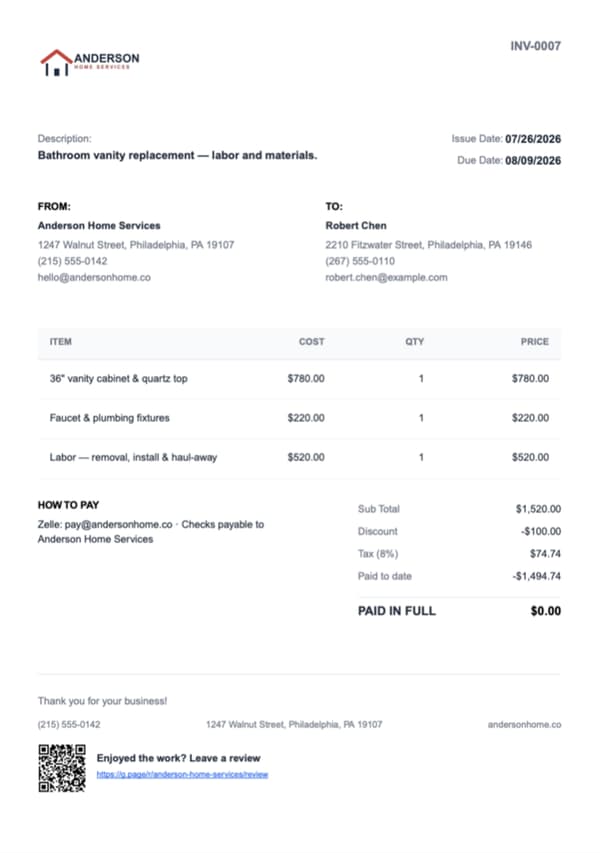
Record payments against an invoice, including partial ones, and Werkly tracks a real paid-to-date and balance. It only says PAID IN FULL once the balance is actually zero. See how it works on Estimates & Invoices.
Werkly never touches the money. You get paid however you already collect (cash, check, Zelle, Venmo) and record it yourself. That's also why Werkly can't run into the payment-processing delays some Joist reviewers report: there's no payment rail in the middle to go slow.
The trade-off is real. If you want a client to pay you from inside the app, Joist does that and Werkly doesn't. Werkly just isn't the one holding your money while it moves.

Where Joist Wins
Real Advantages, Stated Plainly
Joist beats Werkly in a few real ways, and there's no reason to hide it. Joist processes online payments on every tier, including its cheapest one: cards, ACH, Apple Pay, Google Pay, PayPal, and Tap to Pay, with published fees. Werkly doesn't process online payments yet, though it's on the roadmap.
Joist also ships e-signature and a hosted client-facing link, so a client can pay or approve straight from a page Joist hosts, even on its cheapest tier. Werkly shares a static PDF through your phone's share sheet; there's no tap-to-approve page yet.
Joist offers homeowner financing through Acorn Finance, loans up to $100k over 20 years, on its cheapest tier. That's a real reason a remodeler doing bigger-ticket jobs might prefer Joist. Werkly has no equivalent.
And Joist runs on Android as well as iPhone. Werkly is an iPhone app only. If you're on Android, this comparison is moot: Joist is the only option between the two.
Which One Fits
Choose Joist If. Choose Werkly If.

Choose Joist if...
You need to collect payment inside the app, want a client to sign or approve online, plan to offer financing on bigger jobs, or you're on Android. Joist does all of that and Werkly doesn't.

Choose Werkly if...
You want the job itself, hours, photos, notes, and the invoice it produces to live in one place, at a lower price, with a free tier that still exists. That's the specific job Werkly is built for one person's business around.
Werkly vs Joist, Answered Honestly
Real questions people search before switching, answered straight, gaps included.
Is there a free version of Joist?
No. Joist retired its free plan in 2026, so what's left is a 14-day trial and then three paid tiers starting at $10/mo. Werkly has a real free tier, forever: 5 jobs a month, 5 photos a job, 1 invoice per job, no card required.
Is Werkly cheaper than Joist?
At the uncapped tier, yes. Werkly Pro is $12.99/mo ($129.99/yr). Joist's equivalent tier, Pro, which removes the document cap and unlocks photo uploads, is $17/mo, and Joist's automated review requests require its $32/mo Elite tier. Automatic review requests are free on every Werkly plan.
Can I add photos to an estimate or invoice with Joist or Werkly?
Yes on both, and both gate it at their Pro tier. Joist allows up to 20 photos per document at $17/mo; Werkly allows up to 10, a deliberate curated cap, at $12.99/mo. See how it works on Estimates & Invoices.
Does Werkly process online payments like Joist does?
Not yet. You get paid however you already collect (cash, check, Zelle, Venmo) and record it in the app against a real running balance. Online payments are on the roadmap. Joist processes payments on every tier today, with published transaction fees, so if collecting inside the app is what you need right now, that's a real point for Joist.
Can clients sign or approve an estimate online with Werkly, the way they can with Joist?
Not yet. Werkly shares a PDF through your phone's share sheet, and a hosted approve-online page is planned. Joist ships this even on its cheapest tier, so if online approval is something you need today, Joist has it and Werkly doesn't.
Does Joist or Werkly track time on the job?
Werkly has a built-in one-tap timer with rounding rules that feeds straight into the invoice as an editable Labor line item. Joist has no time-tracking feature in any tier. More on Time Tracking.
Is Werkly available on Android like Joist?
Not yet. Werkly is an iPhone app today, and Android is planned, though we're not putting a date on it. Joist runs on both iOS and Google Play right now, so if you're on Android, Joist is the only one of the two you can actually use. If Android is the one thing keeping you off Werkly, tell us and we'll let you know when it lands.
Which is better for a solo contractor, Joist or Werkly?
Honestly: if you need online payments, e-signatures, homeowner financing, or Android, Joist does those things and Werkly doesn't. If you want the job, hours, photos, notes, and the bill it produces to live in one place, at a lower price with a free tier that still exists, Werkly is built around exactly that. If you're weighing bigger platforms too, Werkly vs Jobber covers the crew-software end, and Jobber alternatives for solo contractors lines up the wider field.
See what Werkly does
Estimates & Invoices
Estimates and invoices built from the job, with tax, discounts, and a real balance tracked to paid.
Time Tracking
One-tap timer, editable entries, and hours that land on the invoice automatically.
Job Tracking
One record per job: client, notes, photos, hours, and billing, plus a badge showing where each job stands.
Photo Documentation
Every job photo tagged, captioned, and tied to the job record, so it doesn't get lost in your camera roll.