One Job. One Invoice. Paid Faster.
Build the estimate and the invoice right from the job where you already tracked the hours and snapped the photos, with tax, discounts, and a real running balance until it's paid.


Estimates & Invoices
Everything comes from the job
You won't need a separate invoicing app to babysit, and you won't be digging through your phone for last week's numbers or retyping client details from memory.

Built from the job, not a separate app
Client info, hours, and job notes are already sitting in the job. Your estimate and invoice pull from that record instead of starting from a blank template every time you need to bill someone.

Tax and discounts handled correctly
Set your tax rate once and toggle it per line item. Add a dollar or percent discount at the document level, and it's calculated correctly before tax, so the math matches on both estimates and invoices.

Partial payments tracked to a real balance
Record more than one payment against an invoice: cash today, a check next week, whatever comes in. Werkly tracks paid-to-date and the actual balance, and only shows PAID IN FULL once the balance really is zero, not the moment you send the invoice.

Invoices numbered automatically
Every invoice gets a sequential number with a prefix you set, so you're not numbering by hand, guessing what you already sent, or left with an awkward gap when a number gets skipped by accident.

Estimates
Send a professional estimate in minutes
Open the job, where your notes, hours, and photos already live, tap New Estimate, and the client's name is already filled in. Line items, an expiration date, and a deposit note all fit right on the estimate, if you're asking for money up front. The deposit is a note on the document, not an amount Werkly calculates or collects for you.
The estimate has a real lifecycle: draft, then sent, then accepted or declined. If a client turns it down, you can reopen it and send again instead of starting over from scratch.
Accept an estimate and Werkly sets the job's price and billing style for you, then nudges you toward creating the invoice. The hours you already logged with time tracking are right there waiting.
You share the estimate as a PDF, by text, email, or however you already reach people, and mark it accepted or declined yourself once you hear back. A hosted approve-online page and e-signature aren't there yet, though both are on the roadmap. Werkly is built for one person's business, not a sales pipeline.
Invoices
Tax, discounts, and a balance you can trust
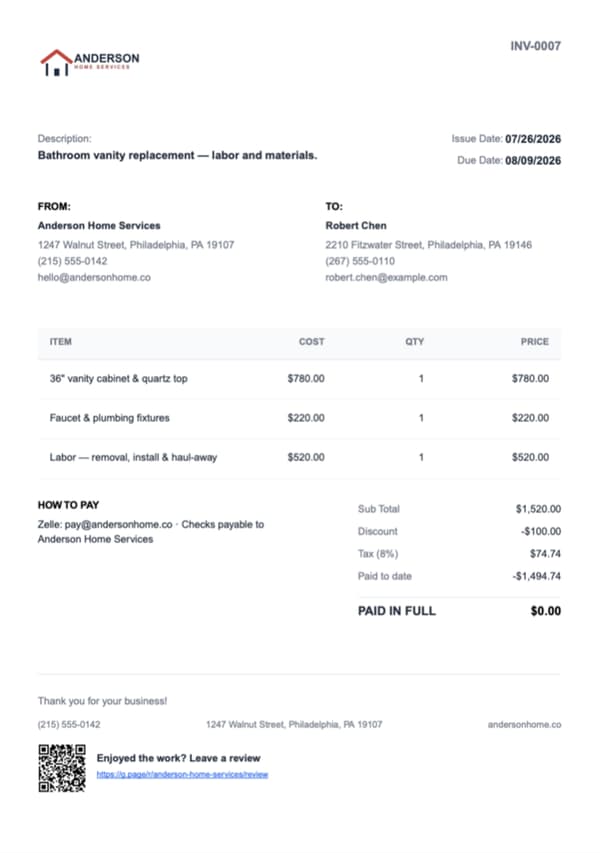
Set your tax rate once and toggle it per line item. It applies the same way on estimates and invoices. Need to knock a little off the total? Add a dollar or percent discount at the document level, and Werkly does the pre-tax math correctly so the number on the PDF is right.
Every invoice gets a sequential number with a prefix you choose, so you're never renumbering by hand or wondering what you already sent.
Add your own payment instructions (Zelle, Venmo, check, whatever you actually use) and they print right on the PDF. You can put job photos on the document too, so the client sees the work next to the number. Record what comes in, including partial payments, and the invoice shows a real paid-to-date and balance. It only says PAID IN FULL when the balance is actually zero.

Estimates & Invoices, Answered Honestly
The real details on how billing works in Werkly, gaps included.
Can I turn an estimate into an invoice?
Yes. Accept the estimate and Werkly sets the job's price and billing style, then carries the line items straight onto the invoice from that job. Adjust anything that changed on site, add your payment instructions, and send it.
Does Werkly calculate sales tax on invoices?
Yes. Set your tax rate once, toggle it on or off per line item, and it applies the same way on both estimates and invoices.
Can a client pay or approve an estimate right from their phone?
Not through Werkly directly. You send the estimate or invoice as a PDF, text, email, however you already reach clients, and mark it accepted, declined, or paid yourself based on how they respond. Online payments, e-signature, and a hosted approve-online link aren't there yet, though all three are on the roadmap. The document stays a plain, shareable PDF for now. If taking card payments in the app is a must-have for you, see how Werkly stacks up against Joist, which does process payments.
Is there a free version?
Yes. 5 jobs a month and 1 invoice per job, forever, no credit card required. Pro is $12.99/mo (or $129.99/yr), removes those caps, and adds your logo to invoices. Full details are on the pricing page.
Does Werkly work on Android?
Not yet. Werkly is an iPhone app today, and Android is planned, though we're not putting a date on it. If that's the one thing keeping you off Werkly, tell us and we'll let you know when it lands.
More of Werkly
Time Tracking
One-tap timer, editable entries, and hours that land on the invoice automatically.
Job Tracking
One record per job: client, notes, photos, hours, and billing, plus a badge showing where each job stands.
Photo Documentation
Every job photo tagged, captioned, and tied to the job record, so it doesn't get lost in your camera roll.
Werkly by trade
Handyman
Price the punch list fairly, invoice before you're back in the truck, and get paid, all from one job.
Painting
Quote by room or the gallon, track the hours and the color the client picked, and invoice with the finished room right on the bill.
Drywall
Price it by the foot, the board, or the sheet, hold hang, tape, coat, and sand on one job, and invoice with the before-the-mud photo.