Carpentry Invoicing & Estimating App
Bid it fixed or hourly, your call, then see what the job actually paid. Price a trim package per linear foot, a built-in flat, or lumber with your own markup. Get the framing photo before the wall closes, and invoice with the finished work right on the bill.



Estimate
Price the Job the Way You Actually Bid It
No two carpentry jobs price the same. A trim package runs per linear foot, an opening gets priced by the door or window, a built-in is a flat number, and lumber is its own line, marked up however your own math already works. Werkly's estimate is a list of editable line items, not a formula the app imposes, so however you already bid a job, it fits. Werkly is built for one set of hands, not a crew you don't have.
If your week is more punch list than custom build, unrelated small jobs instead of one project that doesn't repeat, Werkly for handyman work is probably the closer fit. This page is built around one job with one custom scope.
Need a deposit before you start a bigger build? Write it on the estimate as a note, something like "$500 deposit due at start." Werkly doesn't calculate or collect that deposit. It's a line you type, not a number the app works out.
Every estimate has a real lifecycle: draft, then sent, then accepted or declined. Accept it and the price carries over to the job itself, ready for time tracking and photos once the work gets underway. It's also worth knowing Werkly has a real free tier and built-in time tracking, two things Joist doesn't offer.

Track
Know What the Job Actually Paid, and Get the Photo Before It's Covered
Bid a built-in flat, and Werkly's effective hourly rate shows up once the job's done, the number that tells you whether the flat price actually paid. Bid it hourly instead, and a one-tap timer does the same job in real time: start it when you start cutting, stop it when you're packing up.
Framing and rough-in work gives you one window to document it. Tag a photo Before, During, or Progress on blocking, wiring routed through a stud bay, or anything the next trade is about to bury. It stays on the job with a caption, before the drywaller shows up and that window closes for good.
When a client says "while you're here, can you also case that window," log it as a note on the job right then: what they want, what it'll cost. Price it out loud, then make sure it lands on the invoice as its own line instead of getting absorbed into the original bid for free.
A framing package or a custom build that runs a few days doesn't need a second app to track it. Log hours across the whole job, add a note when the scope shifts, and keep shooting photos as each stage gets covered up.

Invoice
Send an Invoice That Looks Like the Work It's Billing For
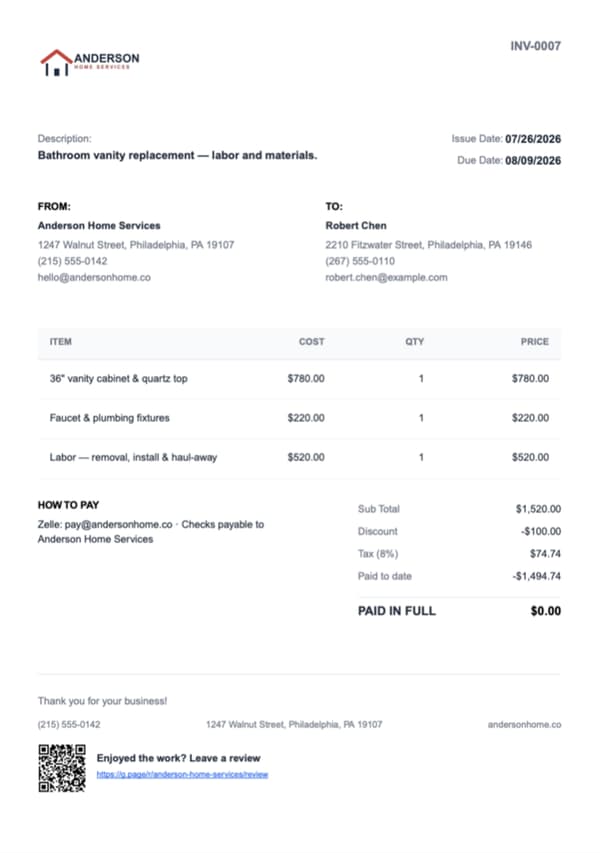
Build the invoice from the same job. If the "while you're here" ask got logged as a note, add it as its own line item instead of letting it disappear into the original bid. The same rule applies as on the estimate: tax per line item, and a document discount if you're knocking something off.
On Pro, pick up to 10 job photos, put them in your own order, and they print right on the invoice PDF with captions. The finished built-in or the mitered stair rail goes right on the bill it's paying for, so the number isn't the only thing the client sees.
None of the carpentry pages built by the big platforms put a job photo on the invoice itself. Werkly does, because the finished work is usually the best argument for the bill.
Get Paid
Track a Real Balance, Then Move to the Next Build
Record payment however a client already pays: cash, check, Zelle, a deposit at start and the rest at completion. Werkly tracks a real running balance instead of a simple paid-or-not flag, and your own payment instructions print right on the invoice.
Mark the invoice paid and a review request goes out automatically. Custom carpentry runs on referral to the next build more than most trades, and asking the moment a job closes beats remembering to ask later.
That's the loop closed: price it, build it, invoice it, get paid. One flat-priced app for one set of hands, not a platform sized for a crew you're not running.

Good to Know
Before You Download
Everything above is live today. Here's where Werkly stops, so you know before you download.
- You price the job you've already scoped: the trim run per foot, the built-in as a flat number, the lumber line with your own markup. Werkly doesn't run a takeoff or calculate materials markup, that math stays yours.
- Payment happens your way: send the PDF, then record cash, check, Zelle, or Venmo against a real running balance. A deposit is a note you write on the estimate, not a number the app calculates or collects. Online payments, a hosted approve-online page, and QuickBooks sync aren't in the app yet. They're on the roadmap.
- Jobs don't carry a calendar date yet, and recurring jobs aren't set up either. Both matter on a framing package or a custom build that runs several days. Scheduling's on the roadmap, so tell us and you'll hear when it lands.
- One login, built for one person. A paid helper on a framing day is completely fine, they just don't get their own login.
- On a job site with no signal, you can still view saved jobs, notes, photos, and hours. Adding or editing needs a connection. It's an iPhone app today. Android's on the roadmap.
If your week is built-ins, trim, stairs, and framing packages priced one job at a time, none of this gets in the way. If you're running a crew that needs its own logins, or a business booked solid on a recurring schedule, Werkly isn't the right fit today.


Carpentry Estimating & Invoicing FAQ
Including the honest gaps, before you download.
What's the best invoicing app for a carpenter?
One that prices custom work the way you actually bid it: per linear foot, per opening, flat, or hourly, not a CRM built to run a crew. Werkly's estimate works that way, and the FAQs below cover the real gaps too.
Should I bid a custom carpentry job fixed or hourly?
Werkly doesn't decide that for you, but it makes either answer easier to live with. Bid it Fixed and see the effective hourly rate once the job's done, or bid it Hourly with a one-tap timer. Either way, you know what the job actually paid, not what you guessed going in.
How do I price trim, built-ins, or lumber on an estimate?
Every estimate is a list of line items you price your own way: per linear foot for trim, flat for a built-in, itemized for lumber and materials with whatever markup you build in. Werkly doesn't calculate board footage or run a takeoff for you.
How do I handle it when a client asks for extra work mid-job?
Log it as a note on the job the moment it's asked, price it out loud, then add it as its own invoice line. Werkly has no formal change-order document, and one job holds one estimate, so a bigger ask is usually cleaner as its own job.
Should I take photos before the drywall or trim covers the framing?
Worth doing on every job. Tag photos Before, During, Progress, or After with a caption right on the job record, before the next trade closes up what you just built.
Can I put a photo of the finished built-in or trim work on the invoice?
Yes, on Pro. Pick up to 10 job photos, put them in your own order, and they print on the invoice PDF with captions, so the bill shows the same craft it's charging for.
Does Werkly handle deposits on custom jobs?
A deposit is a note you write on the estimate, not an amount Werkly calculates or collects for you. You ask for it the way you always have, then record the payment when it lands.
How much does a carpentry invoicing app cost?
Free: 5 jobs a month, 5 photos a job, 1 invoice a job, forever, no card required. Pro is $12.99/mo (or $129.99/yr): unlimited jobs and invoices, 50 photos a job, custom branded invoices, and photos on the document itself.
Werkly for other trades
Handyman
Price the punch list fairly, invoice before you're back in the truck, and get paid, all from one job.
Painting
Quote by room or the gallon, track the hours and the color the client picked, and invoice with the finished room right on the bill.
Drywall
Price it by the foot, the board, or the sheet, hold hang, tape, coat, and sand on one job, and invoice with the before-the-mud photo.
What's inside Werkly
Estimates & Invoices
Estimates and invoices built from the job, with tax, discounts, and a real balance tracked to paid.
Time Tracking
One-tap timer, editable entries, and hours that land on the invoice automatically.
Job Tracking
One record per job: client, notes, photos, hours, and billing, plus a badge showing where each job stands.
Photo Documentation
Every job photo tagged, captioned, and tied to the job record, so it doesn't get lost in your camera roll.