Deck Building Estimate & Invoice App
A deck build runs for weeks, not hours: a deposit at signing, a draw when the framing's done, the balance at completion. Werkly holds one job record across that whole stretch, permit waits included, and puts the framing photo on the invoice before it's buried under decking for good. Built for one person running the build, not per-seat software sized for a crew.



Estimate
Price the Decking Call and the Labor, Separately
Pressure-treated or composite is a real choice a client makes on your estimate, not just a spec detail. Werkly's estimate is a list of editable line items, so you price the lumber on one line, the composite alternative on another if you're showing both, and labor as its own line, all taxed correctly per item. It's built for one person running the job, not a crew-sized tool that prices per seat.
Need a deposit before you order material? Write it on the estimate as a note, something like "$3,000 deposit due at signing." Werkly doesn't calculate or collect that number. It's a line you type, not a figure the app works out for you.
Every estimate has a real lifecycle: draft, then sent, then accepted or declined, with an expiration date if you want one on there. Client wants a change before signing? Reopen it and send again instead of rebuilding the whole quote.

Track
The Job That Survives the Permit Wait
A deck build isn't one visit. It's framing, a footing inspection, a wait for the permit office, more framing, a decking inspection, then finish work. That's weeks of real dead time between visits. Every part of it lands on the same job: notes from the first site visit, hours from every day you're actually on the ladder, and photos from start to walkthrough. It all sits on one record through the gaps.
Start the timer when you get on site, stop it when you leave, or add hours by hand for a day you forgot. Bill the job Hourly or Fixed, and a fixed-bid job shows your effective hourly rate, so you know whether the number you quoted for framing and decking actually paid.
Shoot the framing and footings before the decking goes down. That's the only window an inspector, a future buyer, or a client asking six months later will ever see that structure again. Tag each photo Before, Progress, or After and it stays on the job for good, not buried in a camera roll.

Invoice
The Framing Shot Goes Right on the Bill
Build the invoice from the same job, with tax handled per line item. Every invoice numbers itself, so you're not guessing what you already sent on a job that's been running for three weeks.
On Pro, pick up to 10 job photos, put them in your own order, captions included, and they print right on the invoice PDF. That includes the framing photo the client would otherwise never see again, the shot that proves the joists and hardware were right before the boards went down. It's right there on the document they actually read.
Most deck-estimating tools solve the material math or the invoice, not both, and none of them puts a job photo on the document at all.
Get Paid
Paid in Stages, Tracked to a Real Balance
A deck build gets paid in stages: a deposit at signing, a draw when the framing's done, the rest at completion. Werkly tracks every one of them against a real balance.
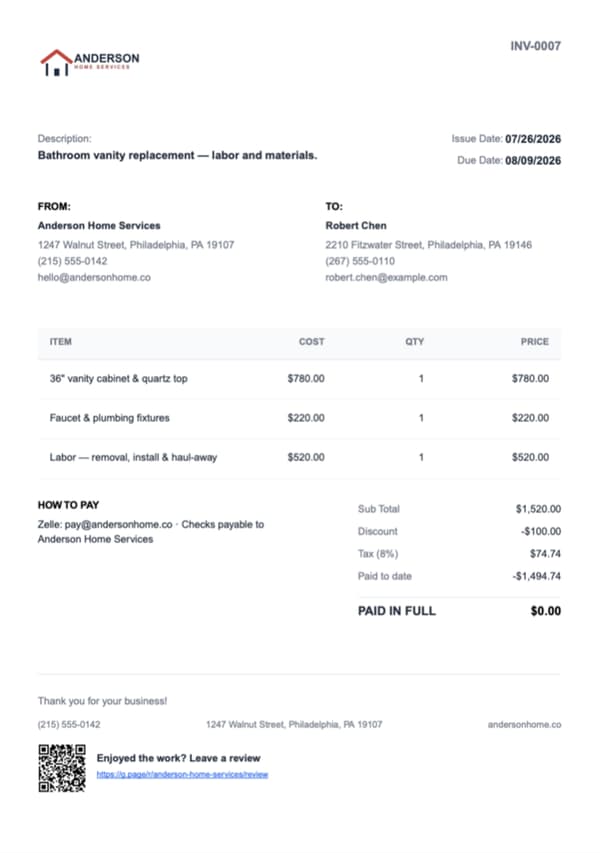
Record each stage as a payment against the invoice: deposit at signing, a draw once the framing's inspected and done, the final payment at completion. Werkly tracks paid-to-date and keeps a real balance, not just a paid-or-not flag.
It only says PAID IN FULL when the balance actually hits zero. A check at signing, cash for the framing draw, a Zelle for the rest: whatever comes in.
Add your own payment instructions and they print right on the invoice. The moment the balance hits zero, Werkly sends an automatic review request. Worth having in a trade that runs on word of mouth, like the neighbor who saw your last build.

Good to Know
Before You Download
Everything above is live today. Here's where Werkly draws the line, so you know before you download.
- Payment happens your way: send the PDF, then record the deposit, the framing draw, and the final payment against a real running balance as they come in, whether that's a check, cash, or Zelle. Online payments and a hosted approve-online page aren't there yet. Both are on the roadmap: tell us if that's what you're waiting on.
- You price the deck you've already designed: lumber or composite on one line, labor on another. Werkly won't turn your dimensions into a board count for you.
- Built for one person. A second set of hands on framing day is completely normal and won't cost you a thing; what's missing is a separate login for them. If your crew needs its own logins, a team-built tool fits better.
- With no signal on site, you can still open a job and see its notes, photos, and hours. Adding or editing something new needs a connection. iPhone is the only platform for now; Android's on the roadmap.
Werkly fits the deck builder running the whole job alone: pricing it, tracking it through the permit wait, and collecting payment in stages against one real balance. It's not built for automatic takeoff math or a crew that each needs its own login.
Deck Building Estimate & Invoice FAQ
Including where Werkly doesn't fit.
Is there an app to estimate deck building jobs?
Yes. Werkly's estimates are editable line items you price your own way: lumber or composite on one line, labor on another, tax handled per line. It's not a board-foot or takeoff calculator, so you're pricing the job, not letting the app guess your material count. Even Joist, which has dedicated pages for several other trades, doesn't currently have one for decking; see how Werkly compares to Joist for the fuller picture.
Does the app calculate how much lumber or composite decking I need?
No, and that's worth knowing before you download it. Werkly has no materials-quantity or takeoff calculator. If you need automatic board-count math from deck dimensions, that's a real gap versus dedicated deck-estimating tools. Werkly's strength is the job record and billing around the estimate, not the takeoff math itself.
Can I collect a deposit and a mid-build draw on a deck job?
You can note a deposit amount on the estimate, something like "$3,000 due at signing," but Werkly doesn't calculate or collect it online. You collect it however you already do, at signing, after framing, at completion, then record each one as a payment on the invoice, where Werkly tracks the running balance.
Should I take photos of the framing and footings before the decking goes down?
Worth doing on every job. It's the only window that structure is ever visible again. Photos stay tagged and attached to the job record, and on Pro you choose which ones (up to 10, your order, captions included) go straight on the estimate or invoice the client sees.
How do I track a deck build that spans several weeks with permit and inspection delays?
One job record holds the whole arc: notes, hours, and photos from the first site visit through the final walkthrough, even with dead time in between waiting on an inspection slot.
How do I track hours on a deck job?
A one-tap timer per job, or add a past entry by hand if you forgot to start it. Bill Hourly or Fixed per job, and fixed jobs show your effective hourly rate, so you know whether the number you bid for framing and decking actually paid.
Can I run a deck building crew in Werkly?
One login, built for one person. A helper who doesn't need to open the app is fine; a second person who needs their own login and their own view isn't something Werkly does today. If your crew needs its own logins, a team-built tool is the better fit; see a few Jobber alternatives for solo contractors if you're comparing options.
How much does a deck building estimate app cost?
Free: 5 jobs a month, 5 photos a job, 1 invoice a job, forever, no card required. Pro is $12.99/mo (or $129.99/yr): unlimited jobs and invoices, 50 photos a job, and up to 10 of those photos on the document itself.
Werkly for other trades
Handyman
Price the punch list fairly, invoice before you're back in the truck, and get paid, all from one job.
Painting
Quote by room or the gallon, track the hours and the color the client picked, and invoice with the finished room right on the bill.
Drywall
Price it by the foot, the board, or the sheet, hold hang, tape, coat, and sand on one job, and invoice with the before-the-mud photo.
What's inside Werkly
Estimates & Invoices
Estimates and invoices built from the job, with tax, discounts, and a real balance tracked to paid.
Time Tracking
One-tap timer, editable entries, and hours that land on the invoice automatically.
Job Tracking
One record per job: client, notes, photos, hours, and billing, plus a badge showing where each job stands.
Photo Documentation
Every job photo tagged, captioned, and tied to the job record, so it doesn't get lost in your camera roll.