Fence Estimating & Invoicing App
Price the job your way: per foot, by material, or gates and hardware on their own line. Note the materials deposit, and keep the job open across however many days a post-and-panel install takes. Werkly isn't a takeoff calculator. It's the job record and the bill.



Estimate
Price It by the Foot, by Material, Gates as Their Own Line
Fence contractors don't price every job the same way. A privacy fence quotes different from chain link, and both quote different from an ornamental aluminum run. Werkly's estimate is a list of editable line items, not a fixed per-foot formula, so you price the fence run, the material, and the labor however the job breaks down. That's the whole app: built for one person's business, not a sales team's CRM.
Gates and hardware get their own line too. A latch kit, a walk gate, an automatic opener: each sits on the estimate separate from the linear-foot fence run, priced on its own instead of averaged into a per-foot number.
Need a deposit before you order materials? Write it on the estimate as a note, something like "$400 deposit due before materials are ordered." Werkly doesn't calculate or collect that deposit. It's a line you type, not a number the app works out for you.
Every estimate has a real lifecycle too: draft, then sent, then accepted or declined, with an expiration date if you want one. Even Joist, which keeps live pages for other trades, doesn't have a real one for fencing; its fencing URL redirects to a generic trades page with no mention of fencing. See the full comparison.

Track
One Job, However Many Days the Weather Allows
A privacy fence job rarely finishes in a day. Posts go in, concrete cures, then panels and rails go up, and rain can push that a day or three. In Werkly, the job stays open the whole time. There's no forced same-day close and no calendar behind it, just one record that holds notes, hours, and photos across however many calendar days the install actually takes.
Track hours with a one-tap timer, or add them by hand, and bill the job Hourly or Fixed. On a fixed-bid job, Werkly shows your effective hourly rate, so you find out after the fact whether that per-foot number actually paid once the terrain got involved.
Snap a photo of the stakes and the property line before the first post hole goes in. Every photo gets tagged Before, During, After, or Other and stays on the job, so if a neighbor disputes where the line landed, the dated shot is already on record.
Write a note the moment you confirm a boundary marker or a client's verbal sign-off on the line. It sits right on the job for the next crew day, or the conversation that comes up six months later.

Invoice
The Before Shot, Right on the Bill
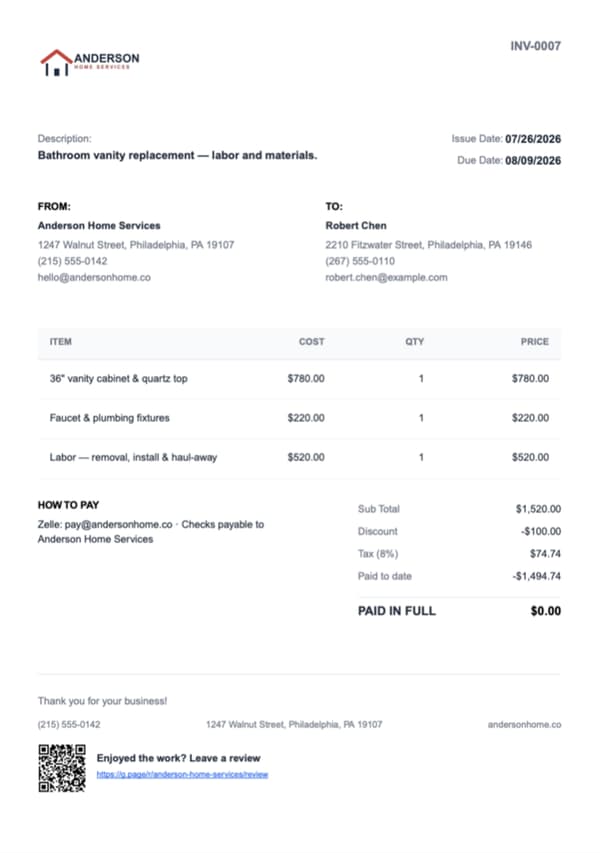
Convert the job to an invoice with tax applied per line item and a document-level discount if you're knocking something off. Every invoice numbers itself, so you're never guessing what you already sent.
On Pro, pick up to 10 job photos, put them in your own order, captions included, and they print right on the invoice PDF. The stake shot from before you dug the first hole is right there on the document the client sees, not buried in a camera roll.
None of the dedicated fence-estimating tools or the CRM platforms put a photo on the bill. Werkly does, from the same job record that priced the gate.
Get Paid
Deposit Up Front, Balance After They Walk the Line Balance
Fence jobs get paid in two stages. Werkly tracks the real balance between them.
Most fence jobs collect a deposit before materials get ordered, then the rest once the client's walked the finished fence line. Record each payment against the invoice and Werkly tracks paid-to-date and a real running balance, not just a paid or unpaid flag.
It only reads PAID IN FULL when the balance actually hits zero. Cash for the deposit, a check for the balance, however the client pays.
Add your own payment instructions and they print right on the invoice. The moment a job is marked paid, an automatic review request goes out, worth having since fencing work leans on referrals and yard signs.

Good to Know
Before You Download
Everything above is live today: the estimate, the job that stays open across however many days the install takes, the photo-backed invoice, the running balance. Werkly stops before a few things. Fence math is one of them: you price the run you've already walked and measured, because the job here is the paperwork and the photos, not a takeoff calculator.
- Payment happens your way: you send the PDF and record cash, check, Zelle, or Venmo against a real running balance. Online payments and a hosted approve-online page aren't built yet. Both are on the roadmap: tell us if that's the piece you're waiting on.
- You track the job while it's happening, not the day it's booked for. Scheduling, a calendar, and recurring jobs for repeat fence clients aren't there yet, but they're planned.
- One login, one person's jobs. A paid helper on post-setting day is completely fine, they just don't get their own login. That's by design: one person, one business.
- Your books stay wherever they already live. QuickBooks sync and exports aren't live yet, though they're on the roadmap.
- Out on a property line with no signal, you can still view saved jobs, read notes, and check photos and hours. Adding or editing needs a connection. It's an iPhone app today; Android is planned.
If your week is quoting fence lines, setting posts, and collecting the balance once the last panel's up, none of this gets in the way. It's a worse fit if you're running a crew on scheduled routes or already invoicing through QuickBooks. See the longer version against Jobber's CRM-and-dispatch approach: Werkly's built around the one person actually digging the holes.
Fence Estimating & Invoicing FAQ
The real details on how Werkly fits a fencing business, including the gaps.
Is there an app to estimate fencing jobs?
Yes. Werkly's estimates are editable line items you price your own way: per linear foot, by material, with gates and hardware as their own line. It's not a takeoff calculator, so you price the job yourself.
Does the app calculate linear footage or how much material I need?
No, and that's worth knowing before you download it. Werkly has no takeoff, quantity, or map-measurement calculator. If you need automatic footage or material math, that's a real gap versus dedicated fence-estimating tools. What Werkly does well is build the job record around the estimate: the notes, the photos, the invoice. It doesn't do the estimate math for you.
Can I collect a deposit before ordering materials for a fence job?
You can note a deposit amount on the estimate, something like "$400 due before materials are ordered," but Werkly doesn't calculate or collect it online. You collect it however you already do, then record it as a payment on the invoice, where Werkly tracks a real running balance to the final payment.
Can I price gates and hardware separately from the fence itself?
Yes. A job holds as many line items as it needs, so a gate, a latch kit, or an opener sits on the estimate as its own priced line, separate from the linear-foot fence run.
Should I take before photos before I start digging post holes?
Worth doing on every job, especially near a property line. Photos stay tagged and attached to the job record, and on Pro you choose which ones (up to 10, your order, captions included) go straight on the estimate or invoice the client sees.
Can a fence job span more than one day in the app?
Yes. A job isn't forced to close same-day; add notes, hours, and photos across however many days a post-and-panel install (or a weather delay) actually takes. There's no calendar or scheduling behind it, the job just stays open until you close it.
How much does a fence estimating app cost?
Free: 5 jobs a month, 5 photos a job, 1 invoice a job, forever, no card required. Pro is $12.99/mo (or $129.99/yr): unlimited jobs and invoices, 50 photos a job, and up to 10 of those photos on the document itself.
Can I run a fence crew in Werkly, or is it just for solo contractors?
One account, one person's jobs. A paid helper on-site, like an extra set of hands setting posts, is fine; you account for what you pay them. What's not there is a login for anyone else, tracking their hours, or assigning them work. If you're weighing this against a crew-built platform, see alternatives built for solo contractors.
Werkly for other trades
Handyman
Price the punch list fairly, invoice before you're back in the truck, and get paid, all from one job.
Painting
Quote by room or the gallon, track the hours and the color the client picked, and invoice with the finished room right on the bill.
Drywall
Price it by the foot, the board, or the sheet, hold hang, tape, coat, and sand on one job, and invoice with the before-the-mud photo.
What's inside Werkly
Estimates & Invoices
Estimates and invoices built from the job, with tax, discounts, and a real balance tracked to paid.
Time Tracking
One-tap timer, editable entries, and hours that land on the invoice automatically.
Job Tracking
One record per job: client, notes, photos, hours, and billing, plus a badge showing where each job stands.
Photo Documentation
Every job photo tagged, captioned, and tied to the job record, so it doesn't get lost in your camera roll.