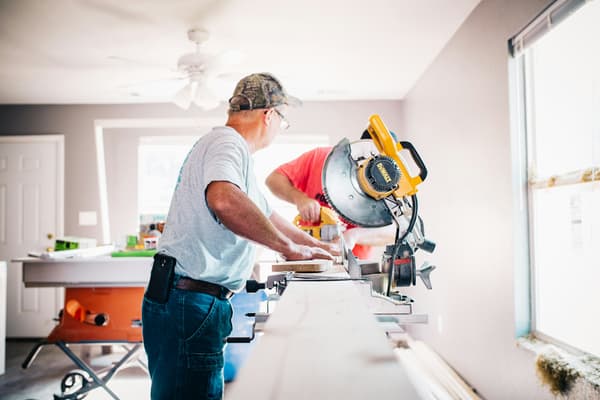
Handyman Invoicing & Job Tracking App
A punch list of small, different jobs, priced fairly and invoiced before you're back in the truck. Werkly is the iPhone app built for one person's business, not a CRM built for a crew you don't have and a subscription to match.



Estimate
Quote the Punch List Before You Leave the Driveway
A handyman visit is rarely one task. It's hang the ceiling fan, patch the drywall, and fix the sticking door, all in the same stop, for one client who booked one visit. In Werkly, that whole visit is one job, and the estimate holds every task as its own line item instead of forcing you to pick one thing to bill and eat the rest.
Build the estimate on-site, right after you've walked the property. Tax applies per line item, so a taxable material and a labor-only task on the same estimate both come out correct without separate math. Share it as a PDF before you're back in the truck, instead of promising to text a number later.
The estimate has a real lifecycle too: draft, then sent, then accepted or declined. Whether the client says yes on the spot or you hear back that afternoon, the number is already sitting on the job, not scribbled on a legal pad you'll dig for later.

Track
Bill the Trip Fairly, Keep the Proof
Not every stop is a big job. A lot of handyman work is a real fix that only takes twenty minutes, and pricing it hourly at your real rate barely covers the drive. Set a rounding rule and a minimum charge once, in Preferences (round to 15 minutes with a one-hour floor, for example), and every timed job bills against it from then on. The quick fix still covers the trip.
Start the timer when you get there, stop it when you leave. The hours land on the job itself, not in a separate app you'd have to remember to check before you invoice.
Snap a photo before you touch anything. Every photo gets tagged Before, After, Progress, or Other and stays on the job, so if a client claims you cracked something that was already cracked, the date-stamped shot is right there.

Invoice
Invoice Before You're Back in the Truck
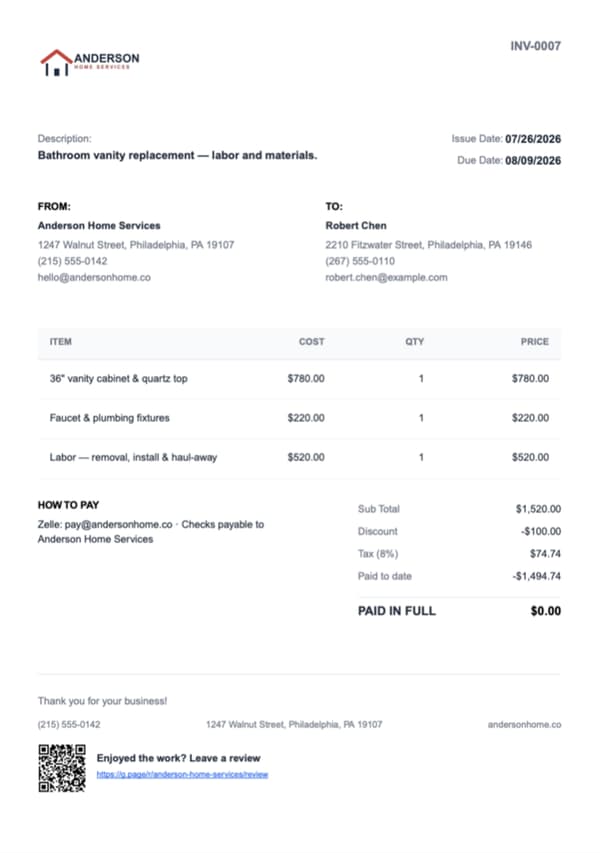
Create the invoice from the same job, and if it was billed hourly, an editable Labor line item is already seeded from the hours you tracked. You're not retyping numbers from a timer app into a billing app.
On Pro, pick up to 10 of the job's photos, in whatever order you want, captions included, and they go right on the invoice PDF itself. The before shot that proves the crack was already there is right there on the document the client actually sees.
Every invoice numbers itself, with the same per-line-item tax and document discount handling the estimate has. You don't have to work anything out by hand between the two documents.
Get Paid
Get Paid However You Already Collect, Then Move On
Cash, check, Zelle, Venmo, whatever a client actually hands you. Record the payment against the invoice and Werkly tracks a real balance, not just a paid or unpaid flag. Partial payments show up too, so the number on the invoice always matches what's actually still owed.
Mark the invoice paid and a review request goes out automatically. Handyman work leans on repeat customers and word of mouth more than most trades, and asking for a review the moment the job closes is worth more than remembering to ask a week later.
That's the loop closed: quote it, do it, invoice it, get paid, without a CRM or a sales pipeline you'll never open, and without a second app to check on the way to the next stop.

Good to Know
Before You Download
Everything above is live today. Here's where Werkly stops, so you know before you download.
- One-off calls and punch lists are exactly what Werkly's built for: no calendar date, no booking ahead. A standing recurring maintenance contract is a different business. Scheduling and recurring jobs aren't in the app yet. That's on the roadmap, so tell us if it's what you're waiting on.
- You get paid the way you already collect: cash, check, Zelle, Venmo, recorded against a real running balance. Online payments and a hosted approve-online page aren't built yet. Both are planned.
- It's one login, built for one person. A paid helper on the job is fine, they just don't get their own login or their own copy of the app.
- Invoices and estimates go out as a PDF today. QuickBooks sync and other exports aren't built yet either. That's on the roadmap too.
- With no signal, you can still open saved jobs, notes, photos, and hours. Adding or editing needs a connection, and it's an iPhone app for now. Android is planned too.
If your week runs on service calls and punch lists, none of that gets in the way. If your business runs on booked-ahead recurring contracts, Werkly isn't the right fit yet.


Handyman Invoicing FAQ
Including where Werkly doesn't fit.
What's the best invoicing app for a handyman?
One that treats the whole visit, however many small tasks it covers, as one job holding the hours, photos, estimate, and invoice together, not a CRM built to run a crew. Werkly is built that way, with the real gaps named on this page instead of hidden until after you download it.
How do I charge fairly for a quick fix, like a trip charge or a minimum?
Set a rounding rule and a minimum charge once in Preferences, round to 15 minutes with a one-hour floor, for example, and every timed job bills against it from then on, so a 20-minute fix still covers the trip out and back.
Can I put several small tasks on one invoice?
Yes. One job holds as many line items as the visit needs. Hang the fan, patch the drywall, fix the door: one invoice for the whole stop.
Can I write up an estimate on-site and send it before I leave?
Yes. Build the estimate on the job, with tax handled per line item, and share the PDF right there instead of driving home and texting a number later.
Should I take before and after photos on handyman jobs?
Worth doing on every job. Photos stay tagged and attached to the job record, and on Pro you choose which ones (up to 10, your order, captions included) go straight on the estimate or invoice the client actually sees.
Does Werkly work for jobs I book ahead of time, or a recurring maintenance contract?
Not yet. There's no calendar or recurring billing in the app today, so Werkly doesn't book work ahead or repeat a standing visit on its own. It picks up when the work starts: tracking, billing, getting paid. For one-off and per-visit work, which is most handyman calls, that's the whole loop.
How much does a handyman invoicing app cost?
Free: 5 jobs a month, 5 photos a job, 1 invoice a job, forever, no card required. Pro is $12.99/mo (or $129.99/yr): unlimited jobs and invoices, 50 photos a job, and up to 10 of those photos on the document itself. For what the alternatives charge, Werkly vs Joist covers the closest one on price, and Jobber alternatives for solo contractors lines up the rest with real numbers.
Can I run a handyman business with a helper in Werkly?
Yes, as long as the helper doesn't need the app. Werkly is one login: you run the job, track it, and bill it, and if you pay a helping hand for the day, you account for that yourself. What it won't do is give a helper their own login, clock their hours, or assign them work. If you're heading toward a real crew, Werkly vs Jobber lays out where that line falls.
Werkly for other trades
Painting
Quote by room or the gallon, track the hours and the color the client picked, and invoice with the finished room right on the bill.
Drywall
Price it by the foot, the board, or the sheet, hold hang, tape, coat, and sand on one job, and invoice with the before-the-mud photo.
Tile
Price the mosaic and the niche fairly, photograph the membrane before the floor covers it, and invoice with the proof on the bill.
What's inside Werkly
Estimates & Invoices
Estimates and invoices built from the job, with tax, discounts, and a real balance tracked to paid.
Time Tracking
One-tap timer, editable entries, and hours that land on the invoice automatically.
Job Tracking
One record per job: client, notes, photos, hours, and billing, plus a badge showing where each job stands.
Photo Documentation
Every job photo tagged, captioned, and tied to the job record, so it doesn't get lost in your camera roll.