Junk Removal Invoicing & Estimating App
Price the load by truckload or by the item, charge the dump fee as its own line, and get the invoice out before the truck leaves the driveway. Werkly is the iPhone app built for one person's business, not a CRM built for a dispatch board.



Estimate
Quote the Load Before You Start Hauling
You size up the pile, not a phone call. Werkly's estimate is editable line items, not a fixed formula, so a volume line, something like "1/2 truck load" priced the way you already price it, sits next to whatever else the job needs.
A mattress, an old tire, a Freon-bearing appliance, a dump fee: each one is its own line instead of getting folded into a total the client can't check. Charge what the job actually costs you, in the open, instead of padding one number and hoping nobody asks.
Build the estimate on-site, before the truck's loaded. Tax applies per line item, so it comes out right without separate math. Share it as a PDF right there instead of promising a number over text later.
The estimate has a real lifecycle too: draft, then sent, then accepted or declined. Say yes and the price carries straight to the job.

Track
Protect the Small-Load Floor, Keep the Proof
Not every pickup fills the truck. A small load, an eighth of a truck, a single bulky item, still costs you the trip out and back. Set a rounding rule and a minimum charge once, in Preferences, and every job bills against that floor from then on. The small load still covers showing up.
Snap a photo of the space before you touch anything, and again once it's clear. Every photo gets tagged Before, After, Progress, or Other and stays on the job, so the emptied garage or basement is on record, not just in your head.

Invoice
Invoice Before You're Back on the Road
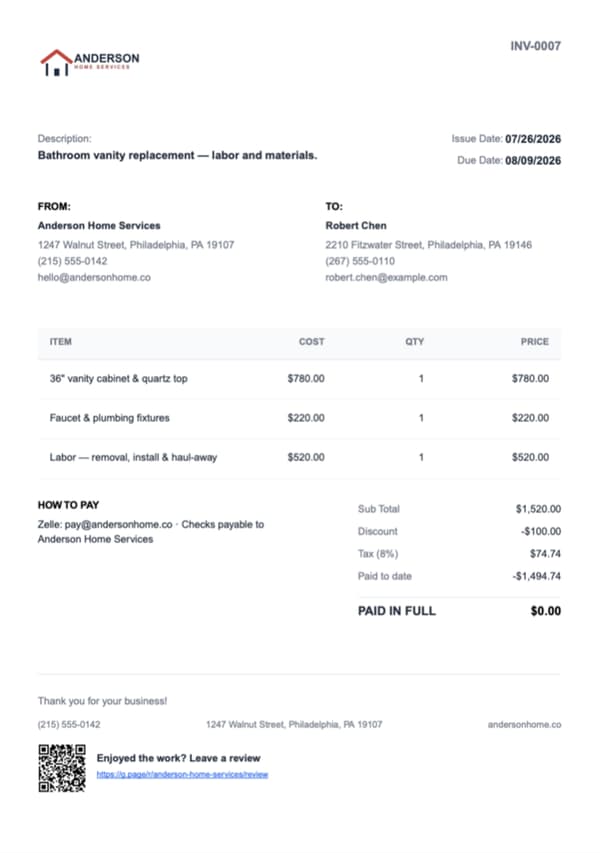
Convert the job to an invoice once the truck's loaded, tax per line item carried straight over. Every invoice numbers itself, so there's nothing to work out by hand between the two documents.
On Pro, pick up to 10 job photos, put them in your own order, captions included, and they print right on the invoice PDF. The empty room, the actual proof the job got done, is on the bill the client sees, not sitting alone in your camera roll. Junk removal software doesn't usually put a job photo on the billing document itself.
Get Paid
Get Paid on the Spot, Then Move On
Cash, card through your own reader, Zelle, Venmo, however the client actually pays. Record the payment against the invoice and Werkly tracks a real running balance, not just a paid or unpaid flag, so a split payment still lands on a correct number.
Mark it paid and a review request goes out automatically. "Junk removal near me" runs on star ratings more than most searches, and asking the moment the job closes beats remembering to ask later.
The whole loop, quote it, haul it, invoice it, get paid, happens in one visit, in one app, with no dispatch board you'll never open.

Good to Know
Before You Download
Everything above is live today. A few things aren't yet. Here's where Werkly stops before you download it:
- You price the load you've already sized up. Werkly doesn't run volume or cubic-yard math for you; it just holds the estimate, the job, and the invoice around the price you set.
- Every job in Werkly is one-off: no calendar date, no repeat billing. That fits one-time residential and light-commercial cleanouts well, but a standing pickup contract with a property manager, or a regular commercial backhaul, isn't a fit yet. Recurring jobs and scheduling are on the roadmap, not live today: tell us and we'll let you know when it lands.
- Payment happens your way: you send the PDF and record cash, check, Zelle, or Venmo against a real running balance. Online payments and a hosted approve-online link aren't live yet; both are on the roadmap.
- One login, one person. A helper lifting the couch on a job is completely fine. They just don't get their own app access. That's by design.
- A couple more worth knowing: QuickBooks sync and exports aren't live yet, both on the roadmap, and it's an iPhone app today, with Android on the roadmap too. With no signal, common on a basement or rural pickup, you can still view saved jobs, notes, and photos. Adding or editing needs a connection.
If your week is one-off cleanouts, residential or light commercial, none of that gets in the way: you still quote it, haul it, invoice it, and get paid in one visit. If your business runs mostly on standing commercial accounts, Werkly isn't the right fit yet.


Junk Removal Invoicing FAQ
Including where Werkly doesn't fit.
What's the best invoicing app for a junk removal business?
One that treats pickup, quote, haul, invoice, and payment as one job you can close out in a single visit, not a CRM built for a dispatch board. Werkly is built that way, and this page names the gaps upfront instead of after you download it.
Can I price a job by truckload or by the item?
Yes. An estimate is editable line items you price your way: a volume line ("1/2 truck load," for example), item surcharges (mattress, tire, Freon appliance), or a flat job price, all on the same document.
Does the app calculate my truckload fraction or cubic yards for me?
No, and that's worth knowing before you download it. Werkly has no volume or cubic-yard calculator. You price the load; Werkly holds the estimate, the job, and the invoice around it.
How do I make sure a small job still covers the trip?
Set a rounding rule and a minimum charge once in Preferences, and every job bills against that floor automatically, so a small load still covers showing up.
Can I put before-and-after photos of the cleared space on the invoice?
Yes, on Pro. Pick up to 10 job photos, put them in your own order with captions, and they print on the estimate or invoice PDF. The emptied room becomes part of the bill, not just a phone gallery.
Can I get paid the same day, before I leave the job?
Yes. Build the estimate on-site, convert it to an invoice once the truck's loaded, and record payment (cash, Zelle, card, however the client pays) before you're back on the road.
Does Werkly handle recurring accounts, like a property manager or a standing pickup contract?
Not yet. Recurring jobs and scheduling are on the roadmap, so a standing pickup contract doesn't repeat on its own in the app today. Werkly fits one-off cleanouts well, and if your week is mostly those, this won't slow you down. If your business runs mainly on standing commercial accounts, a full platform like the ones compared in Werkly vs. Jobber is the better fit right now.
How much does a junk removal invoicing app cost?
Free: 5 jobs a month, 5 photos a job, 1 invoice a job, forever, no card required. Pro is $12.99/mo (or $129.99/yr): unlimited jobs and invoices, 50 photos a job, custom branded invoices, and photos on the document itself.
Werkly for other trades
Handyman
Price the punch list fairly, invoice before you're back in the truck, and get paid, all from one job.
Painting
Quote by room or the gallon, track the hours and the color the client picked, and invoice with the finished room right on the bill.
Drywall
Price it by the foot, the board, or the sheet, hold hang, tape, coat, and sand on one job, and invoice with the before-the-mud photo.
What's inside Werkly
Estimates & Invoices
Estimates and invoices built from the job, with tax, discounts, and a real balance tracked to paid.
Time Tracking
One-tap timer, editable entries, and hours that land on the invoice automatically.
Job Tracking
One record per job: client, notes, photos, hours, and billing, plus a badge showing where each job stands.
Photo Documentation
Every job photo tagged, captioned, and tied to the job record, so it doesn't get lost in your camera roll.